

Kanshi for External Monitor
This is the daily update for another day in my life :). Just so you know, now that I am publishing daily updates on my blog, it takes away an hour from my personal time. So while I had about 3-4 hours of hobby projects time, now I have 2-3 hours only. So the daily updates will be shorter. Continuing on with my fun with the newly purchased external monitor, I had a few more ideas in mind.
When I am using my 27” external monitor, I don’t really need my laptop screen to be on because anyway I don’t need 2 screens, but on top of that, I need glasses to read anything on my laptop. So I wanted to turn off the laptop display everytime my external monitor is connected and the laptop display should turn on as soon as the HDMI is discoonected.
For that I installed Kanshi in NixOS:
services = {
  kanshi.enable = true;
};
That installs Kanshi and also starts the service. Next, I added the following configuration to turn off laptop display when both displays are available and turn on laptop display when it is the only display.
profile "laptop with external display" {
  output "eDP-1" disable
  output "Lenovo Group Limited LOQ 27Q-10 URW1NT4P" {
    enable
    mode "2560x1440@120.000"
  }
}

profile "laptop" {
  output "eDP-1" enable
}
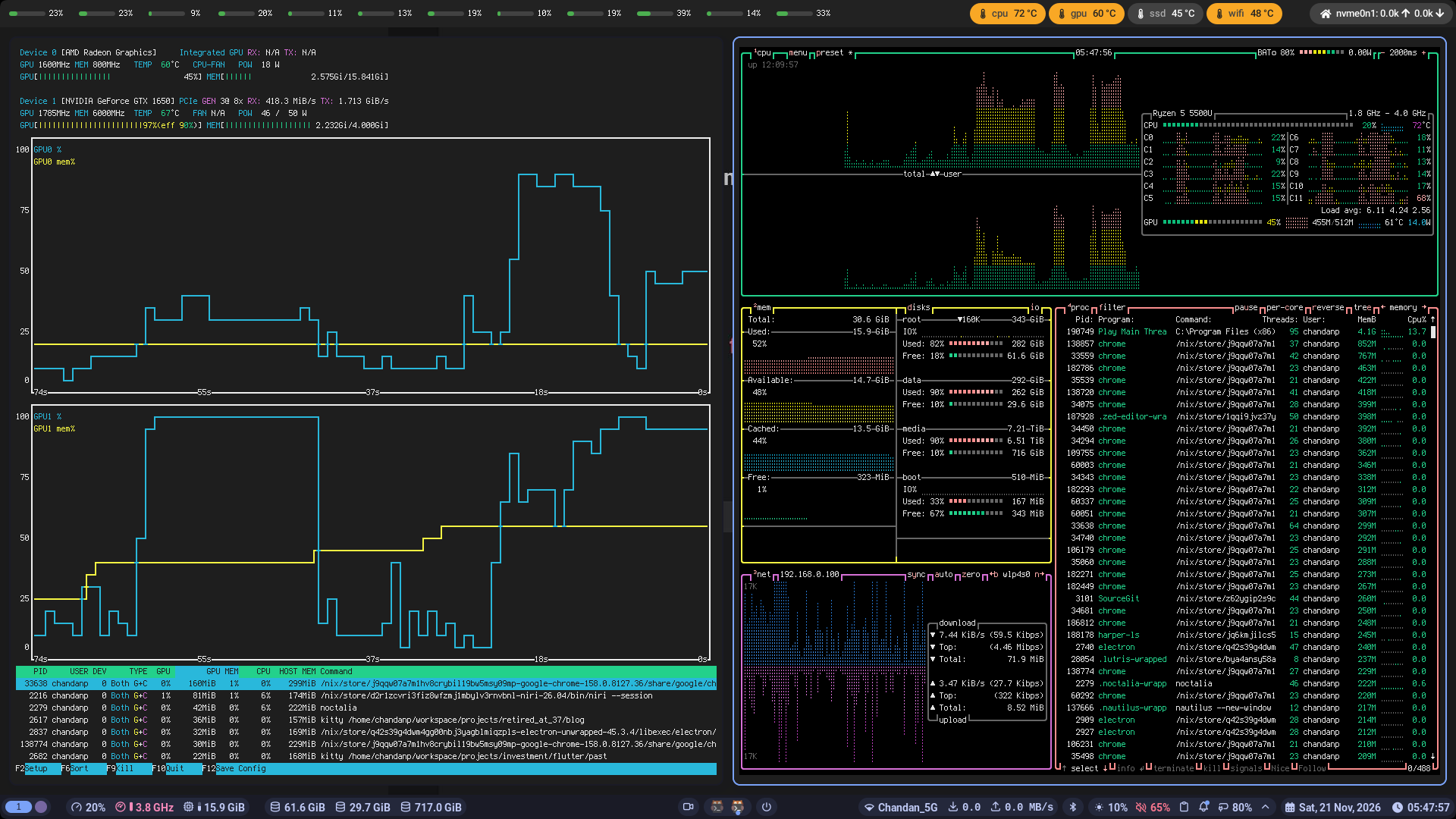
There is one more thing that I’d like to have, which that I want dual screen when I am playing a game. For those of you who don’t know, I play games on Linux using Lutris and Steam. I want to play the game on my external screen, but I want to see the btop and nvtop on my laptop screen. That way I know if my latop is running too hot and if I need to allow the laptop to cool down etc. So I added one more profile to Kanshi which lets me turn on gaming mode.
profile "gaming mode" {
  output "eDP-1" enable
  output "Lenovo Group Limited LOQ 27Q-10 URW1NT4P" {
    enable
    mode "2560x1440@120.000"
  }
}
Then, I wrote a small bash script ~/bin/gaming_mode.sh which I run before starting the game and after ending the game.
#!/usr/bin/env bash

if [[ $# != 1 ]]; then
  echo "Usage: $0 'on|off'"
  exit 1
fi

if [[ $1 == "on" ]]; then
  echo "Gaming mode on"
  kanshictl switch "gaming mode"
  niri msg action focus-monitor "eDP-1"
  sleep 0.3
  kitty nvtop &
  sleep 0.5
  kitty btop --force-utf &
  sleep 1
  niri msg output "HDMI-A-1" position set 9999 0
  niri msg action focus-monitor "HDMI-A-1"
elif [[ $1 == "off" ]]; then
  echo "Gaming mode off"
  killall nvtop
  sleep 0.3
  killall btop
  sleep 0.3
  niri msg output "HDMI-A-1" position set 1920 0
  kanshictl reload
else
  echo "Unknown command"
fi
When I run /bin/gaming_mode.sh on,
- I start the gaming profile in Kanshi (which turns on both my monitors)
- Switch focus to laptop screen (eDP-1)
- Launch
nvtopandbtopin twokittyterminals - Position the external monitor (HDMI-A-1) at a very far offset so my mouse will not accidentally go to laptop screen while playing a game
- Switch focus to external monitor (HDMI-A-1)
I can enjoy my game on the external display while monitoring the laptop condition on the side. This is my laptop display when I am playing Starcraft 2.
One would think that is the end of the setup for an external monitor. But no, there is more. I noticed that my external monitor goes all crazy when coming out of standby if I enable VRR (variable refresh rate) on it. Not sure what is happening but my guess is a broken refresh rate signal. Initially I set my external monitor to always use VRR in my Niri config like so:
output "Lenovo Group Limited LOQ 27Q-10 URW1NT4P" {
    mode "2560x1440@120.000"
    variable-refresh-rate
    focus-at-startup
    position x=1920 y=0
}
The output from niri msg outputs confirmed VRR being on:
 Output "Lenovo Group Limited LOQ 27Q-10 URW1NT4P" (HDMI-A-1)
   Current mode: 2560x1440 @ 120.000 Hz
   Variable refresh rate: supported, enabled
   Physical size: 590x330 mm
   Logical position: 1920, 0
   Logical size: 2560x1440
   Scale: 1
   Transform: normal
But when the monitor goes into standby for sometime and comes back, the screen is all corrupted (tearing). The only way to come out of this situation is to restart the computer or change the config to use a different refresh rate and reloading the config in Niri. I did not like either options.
So what I did was to turn on VRR only when an app is in fullscreen or if the app wants VRR (like mpv). I edited my Niri config to the following:
output "Lenovo Group Limited LOQ 27Q-10 URW1NT4P" {
    mode "2560x1440@120.000"
    // scale 1.125
    variable-refresh-rate on-demand=true
    focus-at-startup
    position x=1920 y=0
}

window-rule {
    match app-id="Battle.net"
    match app-id="steam_app_default"
    match app-id="mpv"
    variable-refresh-rate true
}
Why stop there? I even changed my Kanshi profiles to turn on VRR when gaming mode is on and disable VRR when it is off.
profile "laptop with external display" {
  output "eDP-1" disable
  output "Lenovo Group Limited LOQ 27Q-10 URW1NT4P" {
    enable
    mode "2560x1440@120.000"
    # turning on adaptive sync (VRR) is causing display corruption after standby
    adaptive_sync off
  }
}

profile "laptop" {
  output "eDP-1" enable
}

profile "gaming mode" {
  output "eDP-1" enable
  output "Lenovo Group Limited LOQ 27Q-10 URW1NT4P" {
    enable
    mode "2560x1440@120.000"
    adaptive_sync on
  }
}
That solves all the problems and also takes up all my time in the day :).