

Noctalia and EWW on External Monitor
After fixing the external monitor brightness issue, I moved on to other interesting things. If you don’t already know, I am trying this daily update thing where I post what I am doing on a daily basis. I am trying to capture one day’s worth of what I do in my free time. I keep getting asked what I do on a daily basis from time to time and I wanted to see if people really read my posts to know about my daily activities. So in addition to writing a daily update post which takes away about 1 hour of my time, this is what I do.
To monitor (see the pun?) my system I use Noctalia’s system monitor, which displays my overall CPU, memory, storage usage. On my laptop sceen since I don’t have a lot of real estate, I just show the numbers like shown in the screenshot below.

But on my external monitor, I have a lot more realestate. So I wanted to show more information. In Noctalia, I created a new “Monitor Override” for HDMI-A-1 (for my external monitor) under “Bar: default”. Here I have overridden the widgets where I want to show more information.
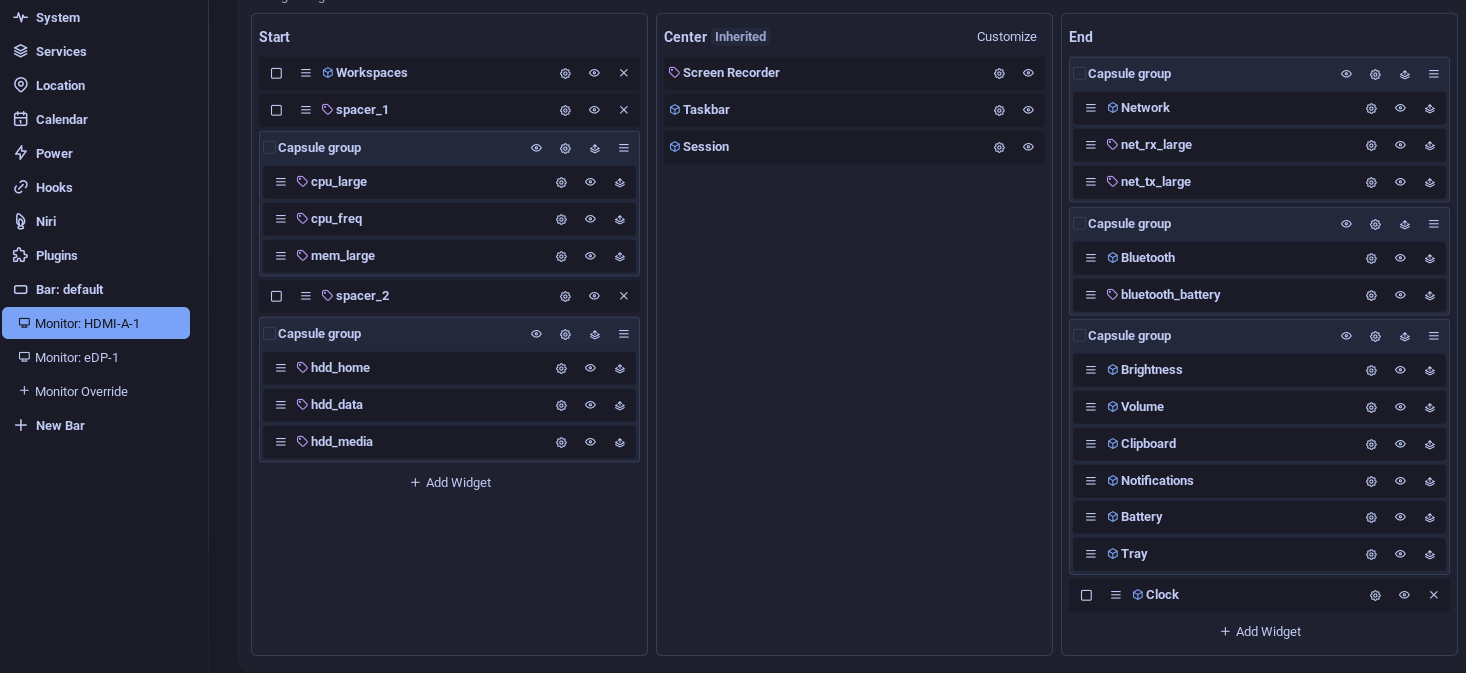
As you can see, I have used a larger system monitors for CPU, RAM and network. Not just that, but since there is lot more space still left over, I have also started showing my bluetooth headset bettery on the external monitor, but not on my laptop screen. So now it looks like this.

But why stop there? I also have EWW (Elkowars Wacky Widgets) bar on my screen. The Noctalia bar is at the bottom of the screen and the EWW bar is at the top. I monitor my individual CPU cores over there. Since there is a lot more real estate on the external monitor, why not make the bars longer? Which is what I did. On laptop, the prgress bar is 48px wide and on HDMI it is 84px wide.
progressbar.core trough {
  background-color: $dark_gray;
  min-width: 48px;
}

progressbar.core-large trough {
  min-width: 84px;
}
The core definition now accepts an optional class:
(defwidget core [index ?class]
  (box :halign "start" :orientation "h" :space-evenly false :class "info core-module"
    (progress
        :class "core ${class} ${
          EWW_CPU.cores[index].usage > 90 ? 'core-red'
          : EWW_CPU.cores[index].usage > 70 ? 'core-orange'
          : EWW_CPU.cores[index].usage > 40 ? 'core-yellow'
          : 'core-green'
        }"
        :valign "center"
        :value "${EWW_CPU.cores[index].usage}"
    )
    (label :text "${EWW_CPU.cores[index].usage}%" :width 24)
  )
)
And I create a different EWW bar for each of the displays (my laptop had 12 threads).
(defwidget cores []
  (box :halign "start" :orientation "h" :space-evenly false
    (core :index 0)
    (core :index 1)
    (core :index 2)
    (core :index 3)
    (core :index 4)
    (core :index 5)
    (core :index 6)
    (core :index 7)
    (core :index 8)
    (core :index 9)
    (core :index 10)
    (core :index 11)
  )
)

(defwidget large_cores []
  (box :halign "start" :orientation "h" :space-evenly false
    (core :index 0 :class "core-large")
    (core :index 1 :class "core-large")
    (core :index 2 :class "core-large")
    (core :index 3 :class "core-large")
    (core :index 4 :class "core-large")
    (core :index 5 :class "core-large")
    (core :index 6 :class "core-large")
    (core :index 7 :class "core-large")
    (core :index 8 :class "core-large")
    (core :index 9 :class "core-large")
    (core :index 10 :class "core-large")
    (core :index 11 :class "core-large")
  )
)
Now my EWW bar looks like this:

Well, that rounds up the daily activity for the day. Writing this blog post alone took 1 hour at least. As you can imagine, I rarely work on anything useful on a daily basis. This is how I waste, err, spend my free time everyday :).