

How I Track My Expenses (2025 Edition)
A reader of the blog was asking if I can write about my expense tracking. So here it. Actually I wrote an article on how I record expenses a few years ago. I strongly urge you to read that first. Nothing has changed on how I record my expenses since that time. The only thing that changed is where I record them. So I thought I will write this updated 2025 version of it.
Until about a year ago, I was recording all my expenses in a spreadsheet. But since I started my own Home Lab, I have an app running on my server to keep track of my expenses. The web app and the server behind it is called Actual Budget.
Now, coming to the meat of the post – how I track my expenses. Most of our expenses are paid through a credit card. We have only one credit card that we both use. If we are both out on our own, then one of us uses the credit card and the other uses UPI. Sometimes a vendor does not accept a card or UPI, in which case we use cash. In some other cases we have to do a bank transfer.
When I make a payment and I am at my computer, for example when ordering something from Amazon etc, I record the expense immediately after making the transaction. Since I am already on my laptop, all I need to do is switch over to my pinned “Actual Budget” tab (it used to be a Google spreadsheet tab earlier) and write down the expense.
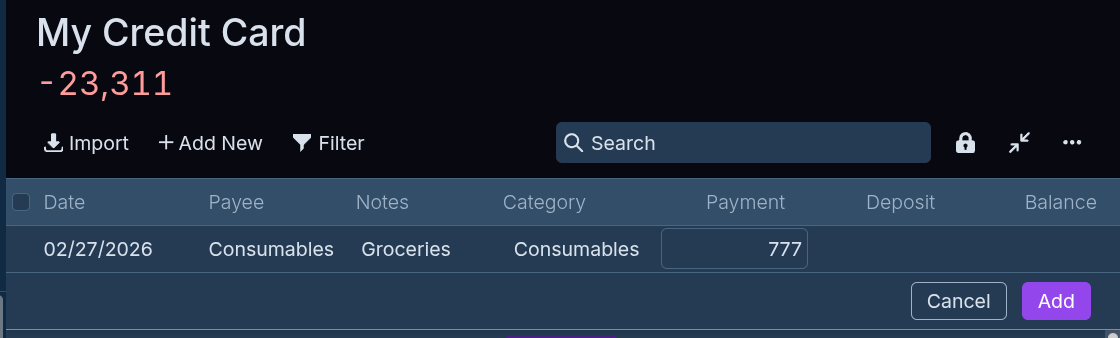
If you don’t want to use an app like I do, you can use a spreadsheet as well. I used to do the exact same thing in spreadsheet (see my previous post on it) before I switched over to Actual Budget.
If I am not at my computer and making a payment outside, then I record the expenses the same day as soon as I can so I don’t forget where I spent the money. But who will remind me to record the day’s expenses? That is where my email comes to rescue. I am not sure if this feature is available in all banks, but every time I make a purchase using credit card or via bank transfer, my bank sends me a “transaction alert” email. Since I check my email multiple times in a day on my laptop (especially at the end of the day to close all pending works for the day), whenever I see the email from my bank, I open the tracking app and record my expense. In the worst case I see the bank email the next day and it is not too long since I made the purchase so I can remember what the expense was for.
One place this logic fails is when we use UPI payments because we don’t get emails for UPI transactions (at least in our case). May be there is setting somewhere that I need to check. But, every time we pay via UPI, we always make it a a point to write notes about the expense. Again not sure if this feature is available with all UPI payment apps, but in GPay there is a “add note” field and I click it, write something that I can remember and then pay. Since I don’t get emails for UPI payments, I usually forget to record them. However, there is trick up my sleeves.
Every week on a Monday I get a recurring Google calendar notification as an email, to reconcile (make one account consistent with another) our bank account statements for the week with my Actual Budget records (or spreadsheet records in the past). So I log in to our respective banks, retrieve the statement for the last week and match each and every line item in the bank statement with my records. Most of the time, they are all recorded and for any UPI payments that I forgot to record, I add them.
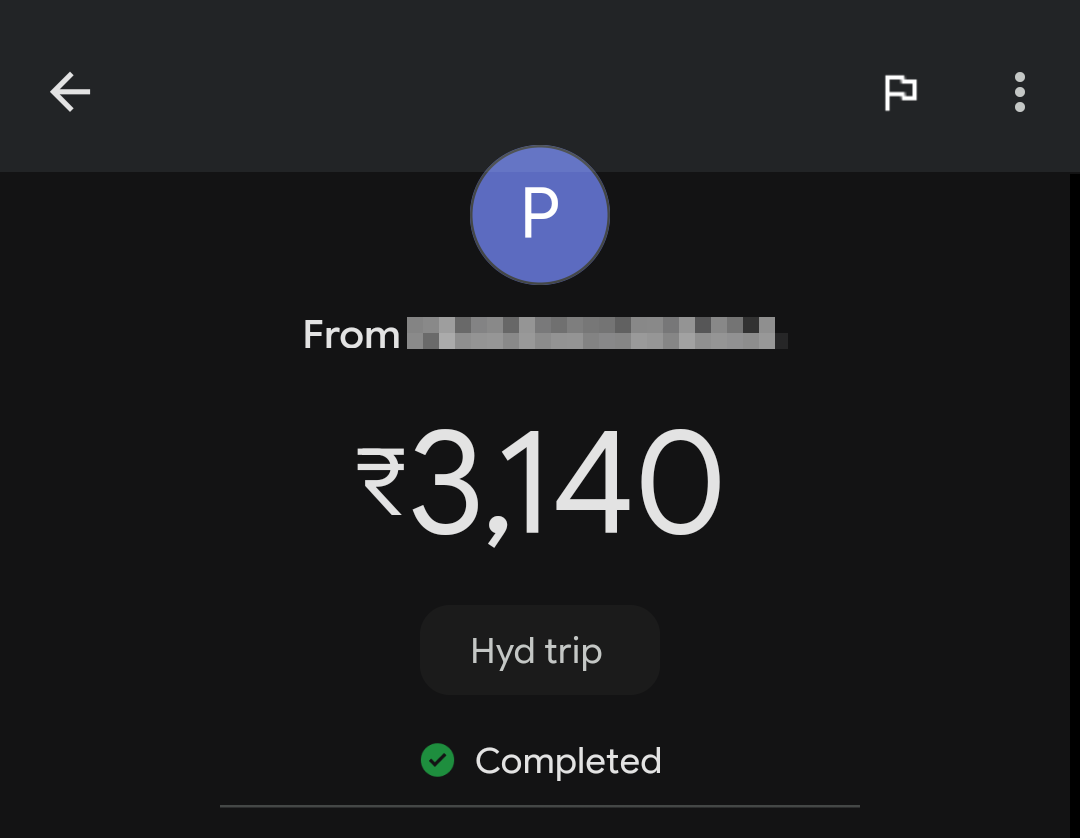
Sometimes, it might have been a week since I spent on something. So I may not be able to recall why I made the expense. Here is where that “note” in GPay comes to rescue. I simply open the app and look at the transaction and the notes is right there helping me understand. You can also see notes when someone transfers you money and wrote a note. See example below.
Now, for the question about how I categories all my expenses, and how much budget I allocate to each category, I suggest you read my very old monthly expenses explained and yearly expenses explained posts. You will find all the details there. If you still have more questions, please leave a comment below. Since I moved from spreadsheet to Actual Budget, my budgets now live in the app. But there shouldn’t be any difference between the app and spreadsheet.
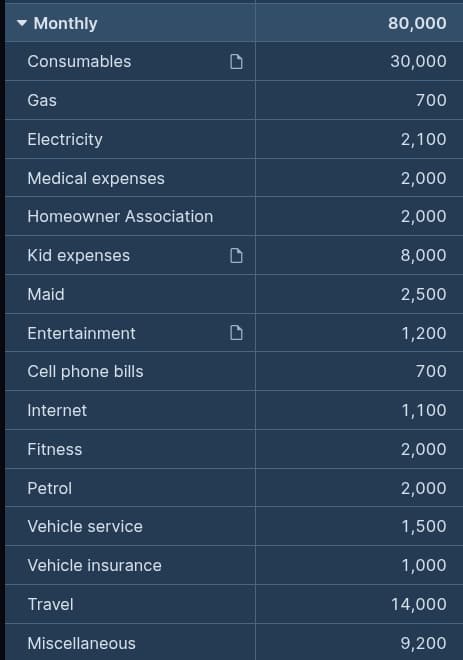
Coming to the question about how I keep to my budget, it varies by expense. Most of the small expenses, especially those in the green category (see monthly expenses explained to understand color coding), I don’t think much about. I spend it as and when the need arises. So if I need groceries, or medicines etc, I just spend as needed. I only check the budget once a year at the end of the year and ask myself if I really overspent in the category or if I should increase the budget for next year (most likely the case).
Note that “unhealthy food” like eating out does not come under green category. They fall in “Entertainment” expense which is in yellow category. For all the yellow categories, I try to be conscious and ask myself before spending, if it really makes sense to spend. But I don’t consult my budget (especially for small expenses) when I am about to spend. I check the budget every month end and ask the same question. If I am out of budget, I stop all spending in the category unless it is really required.
For the categories in the red color code, I first consult the budget even before I spend. If I have budget that I think forward into the future for a year and try to anticipate any other expenses that can fall in the category. Will I have enough budget for all the foreseeable expenses? If so, I indulge in the expense. Obviously there will be some unexpected expenses like when my router died and I had to buy it in the electronics category whether there is budget left or not. Likewise, I did not spend on buying a new AVR when my Pioneer AVR died. I just found ways to live without it.
I almost never buy anything on impulse (in the red category) whether I have the budget for it or not. I will always wait for the best deal. For example, when our TV died, we waited 3 months without proper TV until the one I wanted came at the price I liked. That is all I have to say about expenses. If you have any more questions, please feel free to leave a comment. Finally, I want to leave you with this video.