

Hybrid Graphics Troubles
For context, my laptop has a hybrid graphics card. It means that there is one integrated GPU (Radeon Vega 7 from 5500U processor) and one discrete GPU (NVIDIA GeForce GTX 1650). The problem with having hybrid graphics setup is that you need to worry about not just one but two GPUs.
Recently, I started seeing a peculiar problem. My laptop battery was draining faster than usual when unplugged from power. Earlier it used to last some 2-3 hours with light usage. Now it lasts only about 1 hour. I checked the power usage (upower in linux) and found that it was consuming 10-15W on idle. Normally it only consumes 5-7W.
It started happening only recently, so I know it must have something to do with updating my Linux OS (NixOS). The best part about NixOS is that I can go back and forth between updates to a perfectly accurate previous state very quickly (reproducibility and reliability of NixOS at play here). After booting into an older version of NixOS the problem went away.
Another great feature of NixOS is that it is declarative. And everytime I update or change anything in my configuration, I commit my changes to git. So I could see all the changes that happened since the good commit to the current unstable situation.
Noctalia
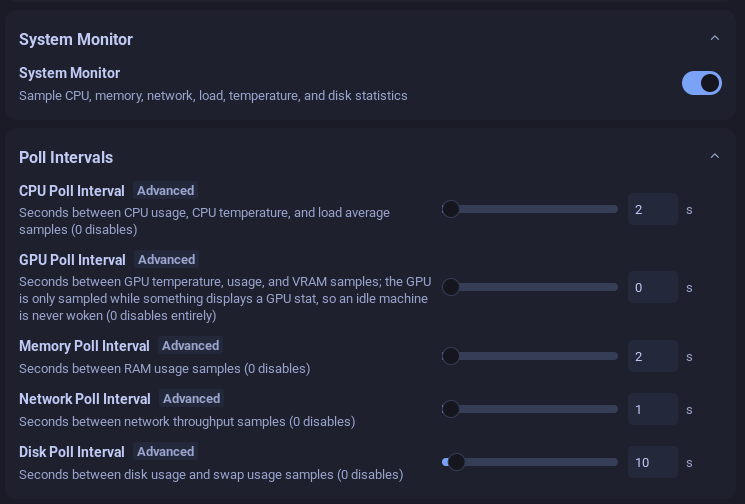
After checking several files I finally narrowed it down to my configuration in Noctalia. I use Noctalia to show some stats about my CPU and memory usage. Recently I noticed GPU usage stats are also available and I added that too. That was causing the discrete GPU (dGPU) to be on all the time.
You see, generally the dGPU which is more powerful and consumes more power (around 50W when it is maxed out) than the iGPU. The dGPU in a hybrid setup should generally be in sleep state. It should only wake up when there is a large GPU load such as when playing games etc. But just showing the GPU stats causes the dGPU to wake up from sleep state and consume power, even if it is just 5W on idle. So I removed the stat and also disabled it in Noctalia settings by setting the poll interval to 0. Finally my dGPU is able to sleep most of the time and my battery lasts much longer.
In case you want to check if your dGPU GPU is going into sleep or not, you can run cat /sys/class/drm/card*/device/power_state and make sure the dGPU is showing either D3cold (when on battery) or D3hot (when on AC power). If it is showing D0, then you know it is awake and consuming power.
mpv
I was happy with the setting and continued on with my merry life until I started seeing this problem again in a couple of days. It took a long time to figure this one out. I watch videos on my laptop using mpv. If I am watching a particularly long video, I might pause it and let it stay that way in one of my workspaces.
On one such days, I kept a video paused, unplugged my laptop and I started to see the dreaded drain on battery issue again. This time it was hard to debug because everything seemed normal, and I did not change anything recently. After a lot of debugging, I finally narrowed it down to my mpv configuration.
You see, I have been using vo=dmabuf-wayland as the video output in mpv, but at some point when I noticed that HDR movies were showing very washed out, I searched the web and found out that using vo-gpu or vo=gpu-next solves the problem. So I changed the settings to use gpu-next. And that was the culprit.
Using gpu-next keeps the dGPU on. After much googling and debugging, I finally found this issue reported on github and there was also a workaround. For my particular case I went with --gpu-api=opengl --hwdec=vaapi as the configuration and that resolved the issue. My battery life is back to normal.
Conclusion
It took 3 days to fix both these issues. Since some of you were interested in knowing how I spend my day after reitrement, I thought I will document at least some of the things I do which take up all my free time. This is one of them. I will try to journal for a few more days and post on the blog. Lets see if it gets any hits or drives my already few readers away :). Until next time…