

CamillaDSP and Room EQ Wizard
In a previous post, I explained how I got CamillaDSP to work with Kodi (Coreelec) to route audio from Kodi to HDMI. In this continuation post, I will go over how I corrected my room’s frequency response using Room EQ Wizard (REW) and CamillaDSP.
For those of you who don’t know, REW is a room acoustic measurement tool. I installed REW on my laptop (running NixOS) using NIXPKGS_ALLOW_UNFREE=1 nix-shell -p roomeqwizard --run roomeqwizard. Then I connected a mic to my laptop, and the HDMI out to the AVR.
There are a lot of tutorials on youtube which will help you run the software. I followed this one. While I don’t have an expensive microphone, I make do with a decent mic. Obviously the quality of the measurement suffers, but at least I have a baseline. Here are the frequency responses of various speakers at my listening position.
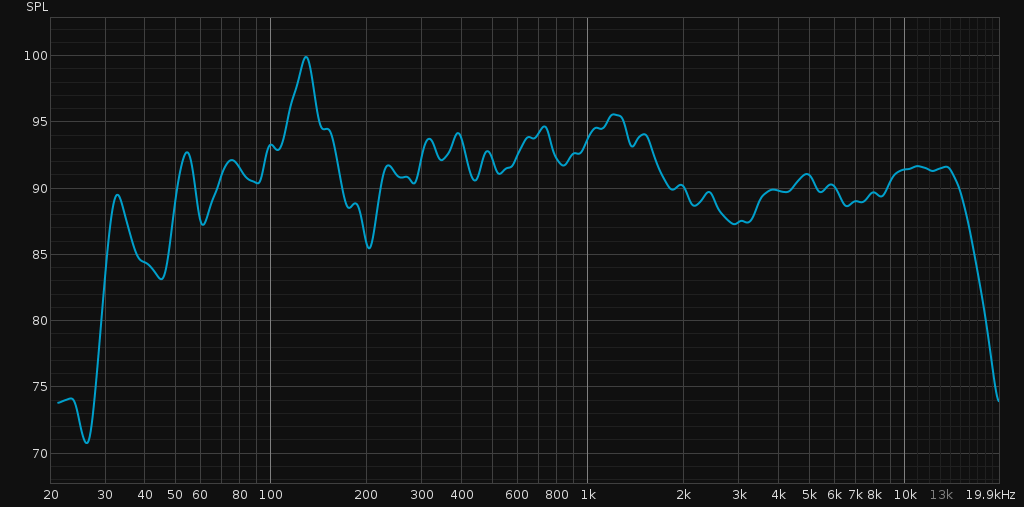
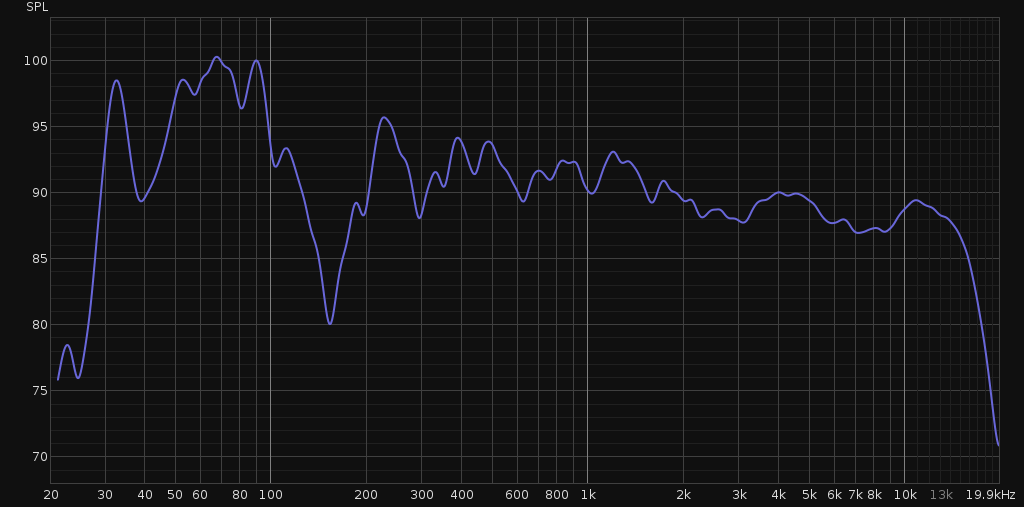
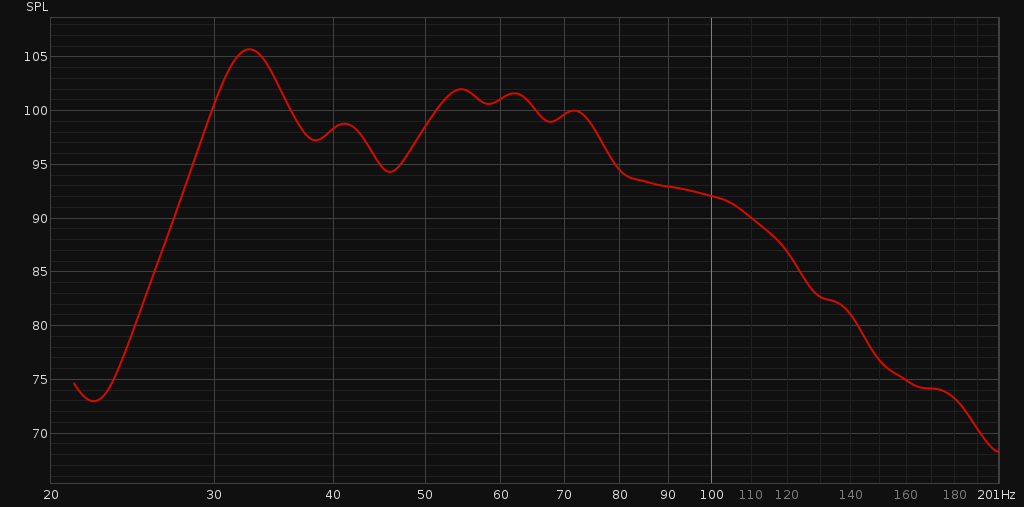
I applied room correction filters following a tutorial on youtube. Here is an example of predicted room response after applying the filters on front left speaker.
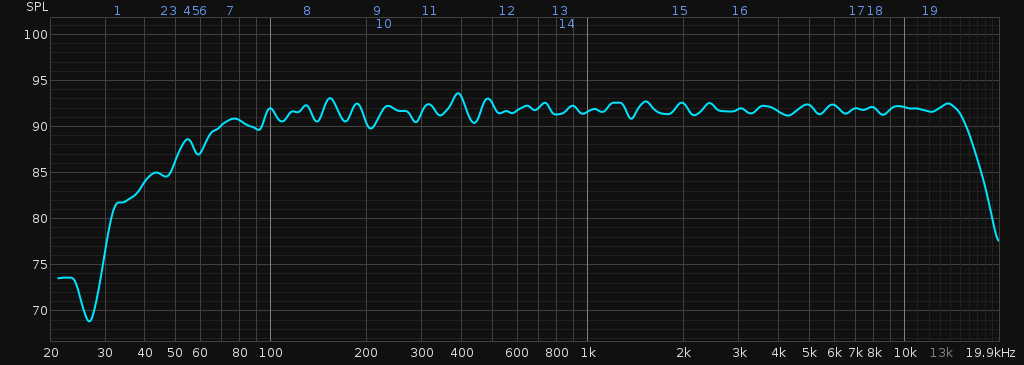
The bright blue line is the predicted room response after applying filters with a roll off of 12db/oct at 60 Hz because my sub woofer will take care of frequencies below that. Look at how nice and flat the response is after applying the filters.
Next, I saved the filters into a file and copied over the filters into my CamillaDSP config file. In the end the file should have something like this:
filters:
  filter_1:
    description: null
    parameters:
      freq: 86.1
      gain: -4.3
      q: 14.791
      type: Peaking
    type: Biquad
  filter_2:
     ...

pipeline:
- bypassed: null
  description: null
  name: remap
  type: Mixer
- bypassed: null
  channels:
  - 0
  description: null
  names:
  - filter_1
  - filter_2
  ...
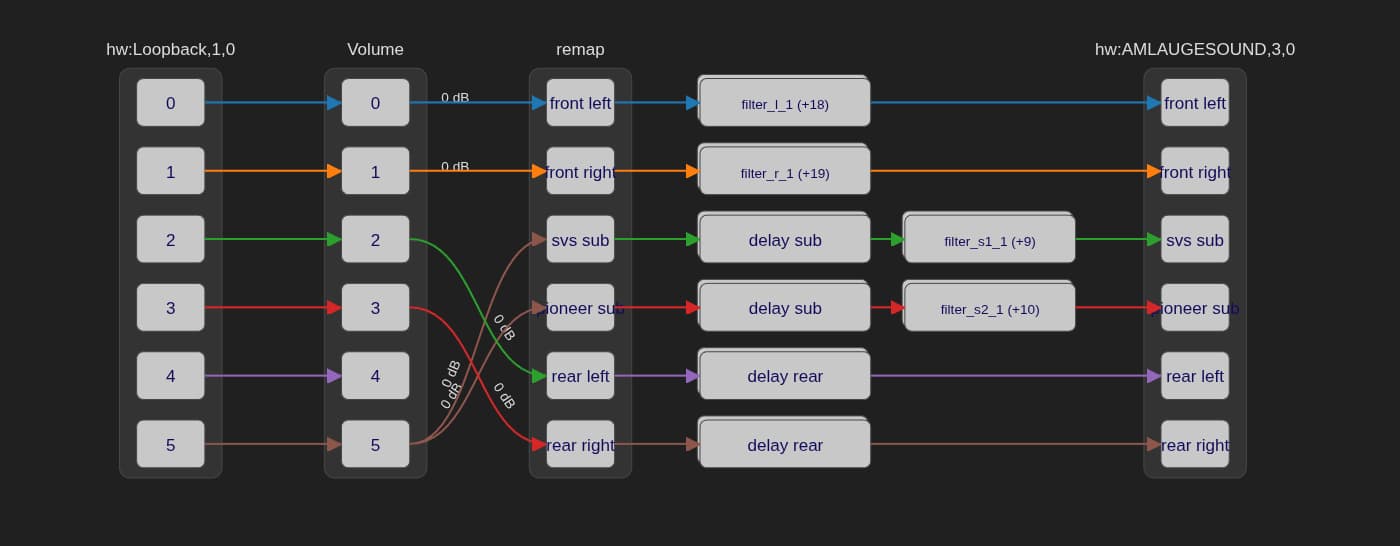
Now load this file in CamillaDSP GUI and apply the settings to DSP. You will hear a remarkable difference in audio quality. At least I did! I did the same for the rest of the speakers. I also added some delay to subwoofers and rear speakers so that all the sound waves reach the hearing position at the same time. Now my music and movies are not so boomy or hollow. They have the right musical note for all the frequencies.
Here is how my final pipeline looks like:
Finally, I added the following to my start up script in CoreELEC so that CamillaDSP runs on boot.
/usr/bin/modprobe snd-aloop
systemctl stop kodi
/usr/bin/nice -n -20 /storage/workspace/camilladsp/camilladsp \
  -s statefile.yml -o camilladsp.log -p 1234 \
  configs/51to41-rew-60hz.yml &
sleep 10
systemctl start kodi
Basically, I insert the snd-loop module which gives me those virtual playback and capture devices. Then I stop kodi because it has to now see the virtual playback device. Then I run camillaDSP which reads from the virtual capture device, applies the filters and mixers and sends the audio to HDMI. Next I wait a few seconds and launch kodi again.
References
- https://github.com/HEnquist/camilladsp
- https://github.com/HEnquist/camillagui-backend
- https://github.com/mdsimon2/RPi-CamillaDSP
- https://www.roomeqwizard.com/
- https://www.youtube.com/watch?v=tLUClxjUTC4
- https://www.youtube.com/watch?v=O8YpPSXKzuE