

CamillaDSP and Home Assistant
If you read my earlier post on CamillaDSP you know that I used REW to get a flat frequency response from my speaker setup at my seating position. When listening to music, I only have the front speaker and subwoofer turned on. The center and rear speakers are off. So all my calibration is based on those 3 speakers. However when watching movies, I prefer to have more thump in the low frequency region and more clarity in the dialogues.
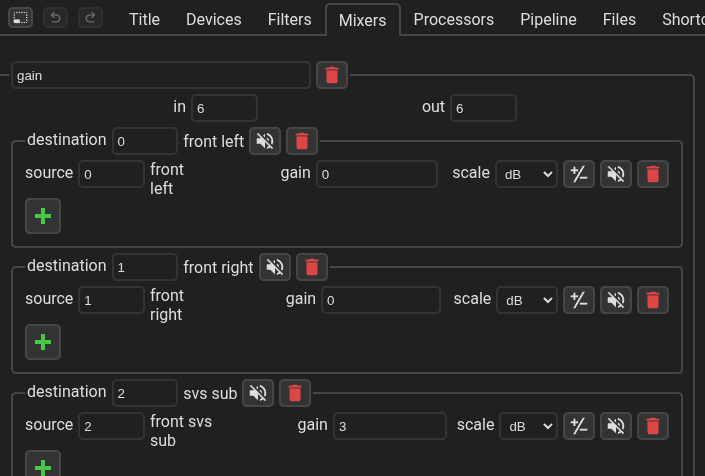
To achieve that I created another configuration in CamillaDSP by copying over the neutral sounding config. Then I increased the center speaker gain by 20% so I can hear the dialogs more clearly. Second, I increased the gain on subwoofer by 3 dB, so there would be more thump when watching movies.
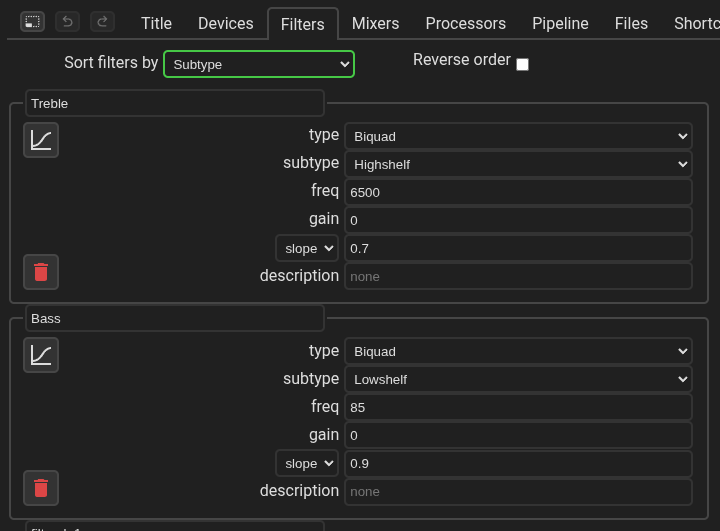
I also added bass and treble filters to both the configs for those times when I need them.
Now I need just one more thing. Have an automation in Home Assistant that will change the configs based on the content that I am watching. I already wrote an automation to turn on/off the speakers based on whether the content is 2 channels or 5.1 channels. I just need to modify it to apply the music config for 2 channel audio and movie config for 5.1 channels.
Fortunately, there is already a CamillaDSP integration for Home Assistant. I installed it and modified my home assistant automation scripts.
automation get_audio_channel_count:
  - id: "get_audio_channel_count"
    alias: Living Room - Get Kodi Audio Channel Count
    description:
      "When media starts playing or if media has changed in kodi, get the number of
      audio channels of the media"
    triggers:
      - trigger: state
        entity_id:
          - media_player.coreelec
        attribute: media_content_type
      - trigger: state
        entity_id:
          - media_player.coreelec
        to: playing
    conditions: []
    actions:
      - action: kodi.call_method
        data:
          method: XBMC.GetInfoLabels
          labels:
            - VideoPlayer.AudioChannels
        target:
          entity_id: media_player.coreelec
    mode: queued

automation surround_sound_control:
  - id: "surround_sound_control"
    alias: Living Room - Surround Sound Control
    description:
      "For 2 channel media turn on front speakers + sub and turn off rear speakers.
      For 5.1 media turn on all speakers."
    triggers:
      - trigger: event
        event_type: kodi_call_method_result
        event_data:
          result_ok: true
          input:
            method: XBMC.GetInfoLabels
            params:
              labels:
                - VideoPlayer.AudioChannels
    conditions:
      - condition: state
        entity_id: media_player.coreelec
        state: playing
    actions:
      - if:
          - condition: template
            value_template: "{{ int(trigger.event.data.result['VideoPlayer.AudioChannels']) > 2 }}"
        then:
          - action: media_player.select_source
            target:
              entity_id: media_player.camilladsp
            data:
              source: movie.yml
          - action: switch.turn_on
            target:
              entity_id: switch.surround_sound_extension_board_front_speakers
          - delay:
              seconds: 1
          - action: switch.turn_on
            target:
              entity_id: switch.surround_sound_extension_board_subwoofer
          - delay:
              seconds: 1
          - action: switch.turn_on
            target:
              entity_id: switch.surround_sound_extension_board_rear_speakers
        else:
          - action: media_player.select_source
            target:
              entity_id: media_player.camilladsp
            data:
              source: music.yml
          - action: switch.turn_on
            target:
              entity_id: switch.surround_sound_extension_board_front_speakers
          - delay:
              seconds: 1
          - action: switch.turn_on
            target:
              entity_id: switch.surround_sound_extension_board_subwoofer
          - action: switch.turn_off
            target:
              entity_id: switch.surround_sound_extension_board_rear_speakers
    mode: queued
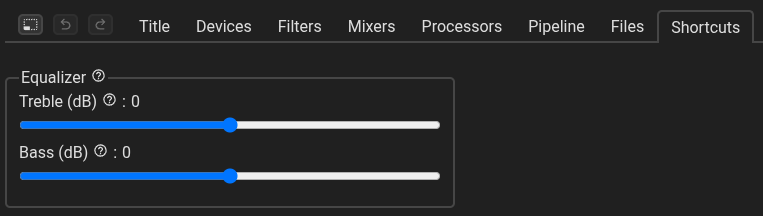
There you have it. All setup done. Now, whenever I listen to music, I have a flatter frequency response and a solid experience with movies. I only wish there is a way to also control the bass and treble from home assistant itself. The integration does not have this feature unfortunately. So I have to use the CamillaDSP GUI to adjust them.
References
- https://github.com/HEnquist/camilladsp
- https://github.com/HEnquist/camillagui-backend
- https://github.com/mdsimon2/RPi-CamillaDSP
- https://www.roomeqwizard.com/
- https://www.youtube.com/watch?v=tLUClxjUTC4
- https://www.youtube.com/watch?v=O8YpPSXKzuE
- https://github.com/kwerner72/homeassistant-camilladsp